

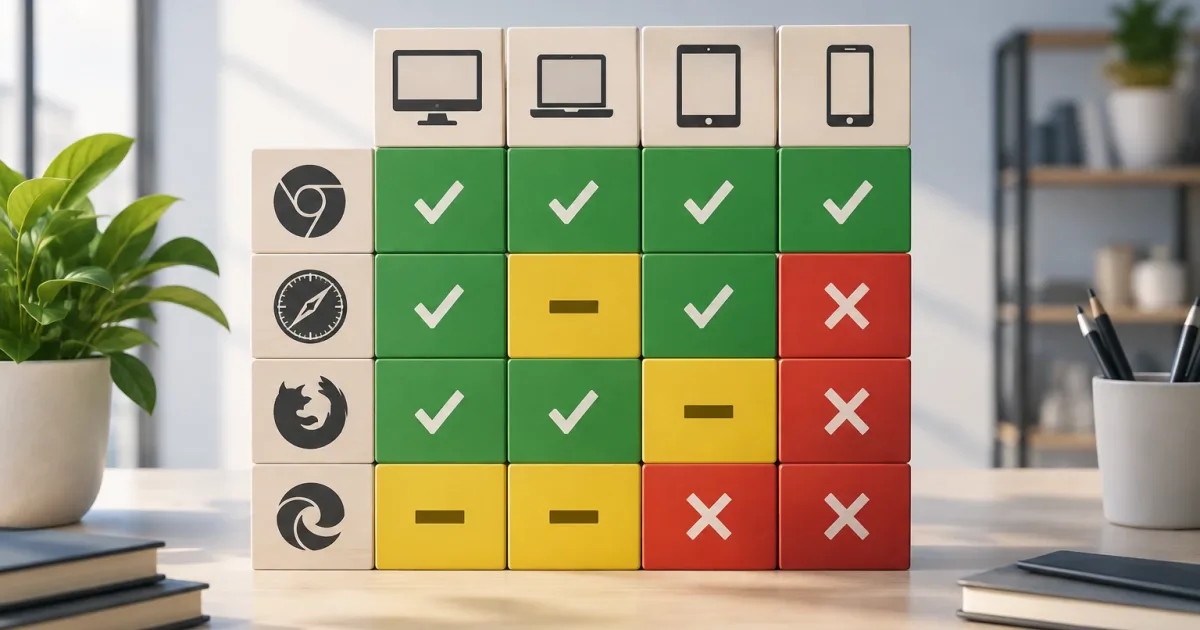
Deciding which browsers, devices, and versions an application supports may seem like a technical task, but the consequences affect the product, the business, and day-to-day operations. A list that is too broad can consume development and testing capacity; one that is too restrictive can exclude important users or breach commitments to customers.
The answer is not to chase every release or choose a version out of habit. It is to document which environments are supported, what level of assurance applies, and under what conditions the decision will be reviewed. A compatibility matrix turns a recurring discussion into a shared standard.
Compatibility is a product and operational decision

A supported environment is not simply one in which the application opens. Its core features must also work correctly, the experience must be acceptable, and the team must be able to detect and resolve problems. The decision should therefore reflect actual usage and maintenance capacity, not just technical preference.
Start by identifying the consequences of a failure. For an internal tool, a temporary workaround may be reasonable; in a purchasing flow or an application that is critical to someone’s work, the impact may be greater. Contractual commitments, security policies, or accessibility requirements may also determine which environments need to be considered.
Agree on who proposes, validates, and approves the matrix. Product can prioritize user needs and segments; technology can assess feasibility and risks; support and business teams can contribute incident data and customer commitments. Without a decision owner, exceptions tend to multiply without anyone taking responsibility for their cost.
Gather evidence before choosing versions
Begin with the context in which the product is used. Find out which browsers and devices people use for important tasks, not just which ones appear most often in overall traffic. Distinguish, for example, between signing in, completing a critical transaction, and viewing content. An environment used infrequently may still be essential to a particular customer or process.
Compare several sources of evidence:
- Usage analytics: Identify the browsers, operating systems, screen sizes, and usage patterns available in your data. Interpret the results cautiously: they may exclude people who do not consent to measurement or who do not complete page loading.
- Support and sales: Review recurring incidents, customer-stated needs, and existing agreements. Distinguish an isolated request from a requirement supported by evidence.
- Technical requirements: Record product dependencies, required browser features, security policies, and restrictions on managed devices.
- Team capacity: Estimate the effort required for development, testing, diagnosis, and maintenance. Supporting another environment involves more than adding it to a list.
If data is missing, record that as uncertainty. You can validate the need through interviews, support records, or a limited trial. Do not treat a lack of evidence as proof that nobody uses that environment.
Set criteria and support levels
Establish criteria that can be applied consistently. These may include the proportion and importance of usage, the criticality of tasks, compatibility with required technologies, security risk, customer requirements, and the cost of maintaining tests. You do not have to reduce everything to a single score: a contractual obligation, for example, may outweigh usage volume.
It is useful to distinguish three levels:
- Guaranteed support: The environment is part of the published commitment. Core features are tested, and reproducible defects are handled through the product’s normal process.
- Validated: The team has checked a defined set of flows, but does not promise complete coverage or equivalent prioritization for every issue. Specify what was validated and any known limits.
- Unsupported: The team does not test or guarantee functionality. If the application still allows access, say so without implying that the experience is covered.
Avoid vague phrases such as “compatible with all modern browsers.” List browser names and versions, or provide a verifiable rule for determining which versions are supported. If support is based on recent versions, define how that period is calculated and where it is published. Precision helps prevent users and teams from interpreting a promise differently.
Balance the cost of maintaining older environments
Supporting older versions may require workarounds, more test combinations, and attention to defects that do not occur in current environments. But ending support also has a cost: affected users, interrupted operations, lost access, and the work of communicating or migrating. Compare both sides rather than treating reduced maintenance as an automatic benefit.
Reasons to reconsider an environment include persistently low usage, no known requirements, significant security issues, limitations that block necessary changes, or a disproportionate testing burden. No single signal is enough on its own. Check whether the data represents the affected population and whether a viable alternative exists, such as updating the device, using another browser, or agreeing on a transition with the customer.
Before ending support, identify which tasks may stop working, how many users and what types of users could be affected, relevant internal dependencies, and the change date. Decide whether there will be an advance notice period, a contact channel, or a temporary exception. An exception should have an owner, a reason, a defined scope, and a review date; otherwise, it can easily become indefinite support.
Validate the matrix and communicate it clearly
The matrix should reflect actual testing. For every guaranteed environment, decide which critical flows will be checked and when: before release, through automated tests where appropriate, and through manual checks for behaviors that require them. You do not need to test every possible combination of device, version, and configuration, but you should explain what coverage you chose and which risks remain outside it.
Prioritize user journeys that affect important outcomes: access, the main task, forms, payments if applicable, and recovery from errors. Also check presentation at relevant screen sizes, keyboard navigation, and messages shown when features are unavailable. Analytics and performance tools can provide useful signals, but they do not replace functional checks or incident investigation.
Publish the matrix somewhere accessible to users and internal teams. Include the update date, support levels, known limitations, recommended alternatives, and a channel for reporting problems. If an unsupported environment can access the application, explain that functionality is not guaranteed; do not present a warning as though it were validation.
A practical template and review cycle

A useful matrix can be maintained in an internal table and summarized in user documentation. At a minimum, record:
- Environment: Browser or application, operating system, device, and version or update rule.
- Support level: Guaranteed, validated, or unsupported.
- Evidence and risk: Observed usage, known requirements, limitations, and tested flows.
- Owner: The person or team responsible for maintaining the decision and coordinating incidents.
- Review condition: An agreed date or a change that triggers reassessment, such as a new dependency, an incident, or a customer requirement.
Review the matrix on an agreed schedule and when significant changes occur; it does not need to change every time a new version appears. Before updating it, assess impact, testing needs, communication, and alternatives. Afterward, retain the reason for the decision so the next review does not have to start from scratch.
The result is not a promise that the application will work perfectly on every device. It is an explicit definition of where the team invests in validating and maintaining the product, what uncertainty it accepts, and how it will respond if needs change. That clarity supports proportionate decisions and makes them easier to adjust with fewer surprises.